
Find a replacement part
Enter what you know about the part. Start with a number, model or name.
No part number? Start here
Start with the closest category, then use the equipment model and the name of the component. A description such as “DC4110 fuser gear” gives more context than “gear.”
- Printer & Scanner Parts
- Lawn, Garden & Equipment Parts
- Cables & Wiring
- RF & Coaxial Components
- Industrial Electronics & Cooling
- Automotive & Motorcycle Parts
These links open the existing product collections. Other equipment and part types are available in the category center.
Browse categoriesWhere to look for a reference
- On the old part
- Check labels, stamped markings and molded lettering. Copy the whole reference, including any suffix.
- On the equipment label
- Record the manufacturer and complete model. A machine serial number identifies the machine; it may not be a searchable part reference.
- On packaging or a parts list
- Look for the item reference beside the component name. Compare it with the old part before searching.
Not sure what to search for? Contact Keyead
Help when you need it
See example parts
These are existing Keyead listings. The photo and title help you identify a search term; confirm the fit details in the listing or ask about anything missing.
-
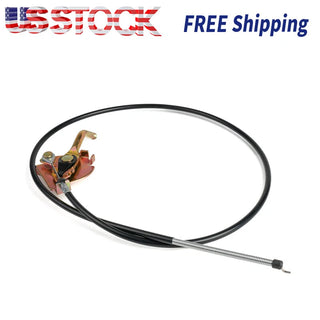
AUC10902 Throttle Control Cable Assembly for John Deere
Start with AUC10902, then compare the cable ends, length and mounting details. The listing title alone does not confirm fit for every John Deere model.
Open the product listing -
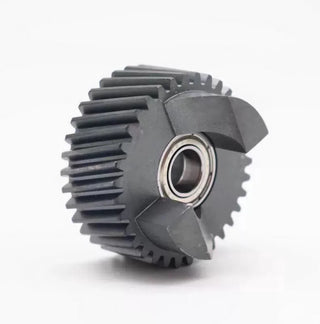
( ) Fuser drive gear Joint for Xerox 900 1100 DC4110 4112 4127 007K88700
Keep both leading zeros in 007K88700. Compare the complete printer model, joint shape and the parts included before choosing this listing.
Open the product listing -
DD350N16K Rectifier Diode Module for Infineon/EUPEC
Use the full DD350N16K designation. Compare the documented ratings, terminal layout and mounting details with your equipment requirements.
Open the product listing
What should I check before buying?
You have a number
Copy the complete reference
Read it from the old part or its documentation. Check O against 0 and I against 1. Keep prefixes, spaces and hyphens as supplied.
Try that reference first
Use one number per search. If it returns nothing, try the equipment model with a precise component name. Keep the original reference for checking results.
Open the listing and compare
Read the full title, description, variant choices and package contents. A matching number still needs the model and physical details checked.
Choose a part type for a focused checklist. Record your old part measurements with units, then compare them with the information the listing actually provides.
A missing measurement means the detail still needs checking. Selecting a checklist does not confirm that a product fits your equipment.
Control cables and wiring
- Complete reference and the equipment model or application stated in the listing.
- Cable or sheath length, the measurement endpoints and the unit used.
- Both end fittings, connector shape, orientation and any mounting clips.
- Adjustment features and whether the package contains one cable or an assembly.
Printer gears and mechanical parts
- Complete printer model and the full component reference, including suffixes.
- The shape of the bore or joint, mounting points and orientation.
- Dimensions and visible features such as gear teeth, where the listing supplies them.
- Whether the listing is for one part or a set, and which pieces are included.
RF connectors and cable components
- Connector series and the exact part designation stated in the listing.
- The mating ends, contact configuration and mounting arrangement.
- Cable type or size and dimensions wherever these are documented.
- Published ratings and package contents. Similar-looking connectors may have different specifications.
Electronic modules
- Complete designation, including the letters and suffixes after the main number.
- Documented electrical ratings and the equipment requirements.
- Terminal markings, connection layout and mounting dimensions.
- The listed quantity and included accessories. Ask for missing specifications instead of estimating them from the photograph.
Read the search labels correctly
Exact SKU match
The search text equals a SKU recorded by this shop. It identifies that catalog entry; it does not verify the equipment fit.
Reference appears in title
The complete reference appears in the title. Check the rest of the title and the listing details for the model, version and included parts.
Catalog search result
The item matched searchable catalog information. Open it to see why it may be relevant before treating it as a replacement candidate.
Prepare a question about one part
Optional: fill in only what you know, then copy the message for our contact form. Nothing is sent from this page.
Useful photos show the whole part, its label and both ends or connectors. Include mounting points and a ruler in the same plane as the dimension you are recording.
Send the summary through the contact page or the contact details shown there. Preparing or copying text on this page does not send a request.
Common questions
Why did my part number return no results?
Check the characters and search one reference at a time. Then try the equipment model with the component name, or browse a category. The item may use a different description or may not be listed. A missing search result does not establish whether a replacement can be supplied; send the reference and photos if you need help checking.
Several parts have this number. Which one should I choose?
Open each listing and compare the complete description, variant, dimensions and package contents. Check whether the titles describe different quantities or versions. If the listing does not explain a difference that matters to your equipment, include both links in your question before ordering.
Can I identify a part from its photo alone?
Use a photo to narrow the search and to show the shape, connector or mounting arrangement. Compare the reference, model and specifications as well. Parts with a similar outline can differ in dimensions or connection details, so an image alone does not confirm fit.
Is the shop SKU the same as the part number?
They can be different. A shop SKU identifies an entry in this catalog; a manufacturer reference identifies the part in the source documentation. Keep both when they are available and state which number you copied from the old part.
The listing is missing a dimension I need. What next?
Measure the old part and record the unit and endpoints. Send the candidate listing, equipment model and the dimension you need checked. Leave that detail unconfirmed until you have an answer; do not calculate a dimension from the scale of a product photo.